
How to Install Ruby (and Jekyll) on Windows, Mac and Linux
How to install Ruby and Jekyll on Windows, Mac and Linux in 2026: which Ruby version to pick, step-by-step commands, and fixes for the usual errors.
In this post
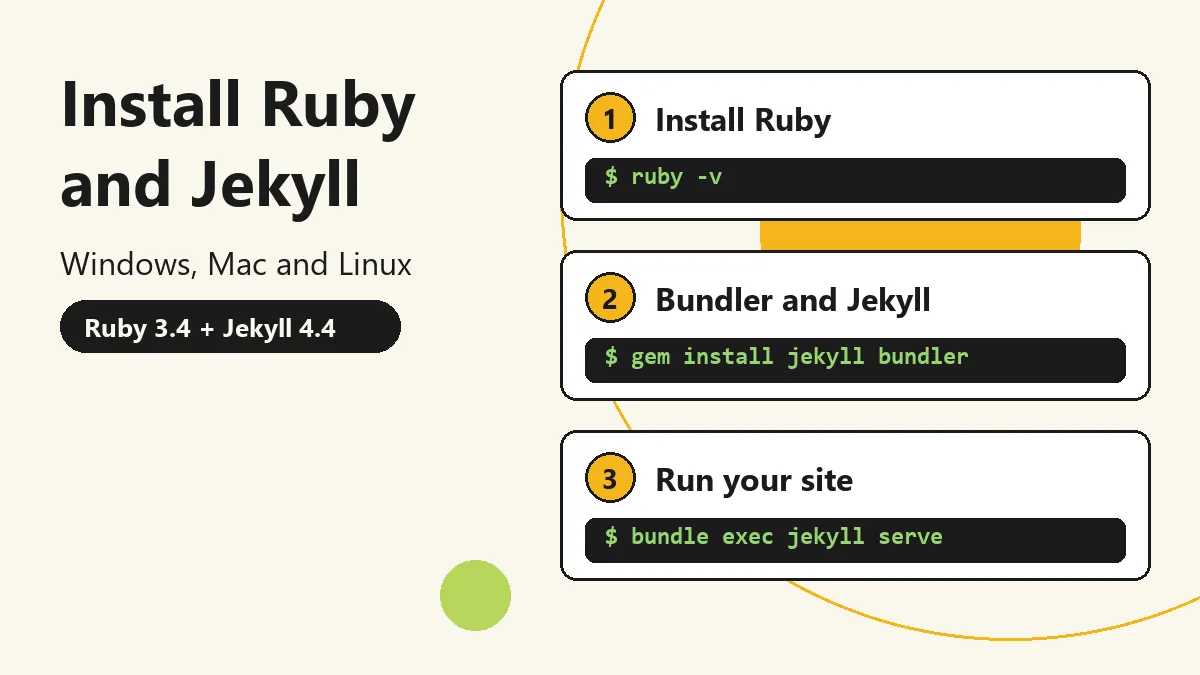
Here is how to install Ruby on Windows, Mac or Linux, then add Bundler and Jekyll on top. Pick a current Ruby (we suggest 3.4), install it with the right tool for your system, check it with ruby -v, then run gem install jekyll bundler.
Everything below was checked on 23 November 2026, and it is the same setup we use to build our own Jekyll themes.
Quick answer
- Which Ruby: Ruby 3.4 (3.4.13 is the latest 3.4 release). It is in normal maintenance and it is what we build our own Jekyll themes on.
- Windows: download Ruby+Devkit 3.4 (x64) from RubyInstaller, run
ridk install, open a new terminal. - Mac:
brew install chruby ruby-install, thenruby-install ruby 3.4.13. Don’t use the Ruby that ships with macOS. - Linux: on Ubuntu or Debian,
sudo apt-get install ruby-full build-essential zlib1g-devworks, but for a supported Ruby use rbenv or mise. - Then, on every system:
gem install jekyll bundler. - Verify:
ruby -v,gem -v,bundle -vandjekyll -vshould all print a version.
Which Ruby version should you install?
Short answer: Ruby 3.4. Here is the current picture, from the Ruby downloads page and the branches page:
| Ruby | Latest release | Status |
|---|---|---|
| 4.0 | 4.0.10 (18 Nov 2026) | Normal maintenance |
| 3.4 | 3.4.13 (18 Nov 2026) | Normal maintenance |
| 3.3 | 3.3.14 (18 Nov 2026) | Security only, until 31 Mar 2027 |
| 3.2 | 3.2.11 | End of life (1 Apr 2026) |
Ruby 4.1 is only a preview, so ignore it for now.
Why 3.4 for Jekyll, and not the newest?
- It is in normal maintenance, so it still gets bug fixes, not only security patches.
- Jekyll’s own macOS guide installs Ruby 3.4.
- The latest Jekyll, 4.4.1, came out in January 2025, before Ruby 4.0 arrived on 25 December 2025. The Jekyll 4.4.0 release post recommends Ruby 3.2 or newer.
- We build every one of our themes on Ruby 3.4, so it is the version we have tested.
Ruby 4.0 is fine for general Ruby work. If you choose it for Jekyll, test your site after installing. Jekyll itself needs Ruby 2.7 or newer, so an older Ruby will run it, but 3.2 is already past end of life and 3.3 is close.
If you are wondering whether Jekyll itself is still worth learning, we wrote that up in Is Jekyll dead?.
Install Ruby on Windows
Jekyll says Windows is not officially supported, but it works well with the right setup. The easiest route is the Ruby installer for Windows from RubyInstaller.
- Open the RubyInstaller downloads page.
- Under With Devkit, pick the Ruby+Devkit 3.4.x (x64) build. At the time of writing that is 3.4.13-1. Builds for 4.0.10-1 and 3.3.14-1 are listed too.
- Run the installer and accept the defaults.
- On the last installer page, keep the box ticked to run
ridk install. A terminal opens. Choose MSYS2 and MINGW development toolchain and press Enter. - Close that window, then open a new terminal (PowerShell or Command Prompt). A new terminal matters, because the old one does not know about Ruby yet.
- Install Jekyll and Bundler:
gem install jekyll bundler- Check it:
ruby -v
jekyll -v
Prefer the command line? If you use winget, list the available packages first, because the IDs change with each Ruby line:
winget search RubyInstallerTeam.RubyWithDevKitThen install the one you want, for example:
winget install RubyInstallerTeam.RubyWithDevKit.3.4Check the ID with winget search before you run the install. You still need to run ridk install afterward.
Live reload on Windows. For --watch to notice file changes, Jekyll’s docs add the wdm gem to the Gemfile:
gem "wdm", "~> 0.2.0", :install_if => Gem.win_platform?Another option is WSL. Windows Subsystem for Linux gives you a real Ubuntu, and then you follow the Linux steps below. It is a good choice if you already live in a Linux terminal.
Our own setup is Windows 11 with RubyInstaller Ruby 3.4.4 (x64-mingw-ucrt) and Bundler 2.7.1:
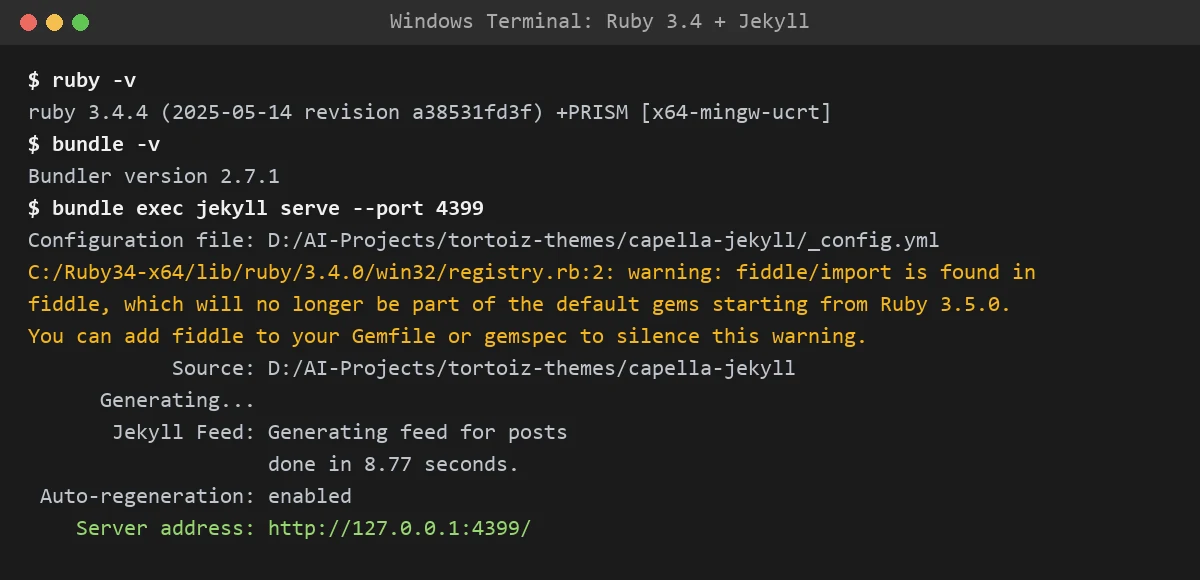
About that warning. On Ruby 3.4, Jekyll prints a line like this:
warning: fiddle/import is found in fiddle, which will no longer be part of the default gems starting from Ruby 3.5.0. You can add fiddle to your Gemfile or gemspec to silence this warning.It is harmless. To silence it, add gem "fiddle" to your Gemfile.
Install Ruby on Mac
Don’t use the Ruby that comes with macOS. It is old, and installing gems into it needs sudo, which leads to permission errors later. Install your own copy instead. Jekyll’s macOS guide uses chruby and calls it the simplest option and the least likely to cause issues. We agree.
- Install Homebrew if you don’t have it.
- If macOS asks for the Command Line Tools, install them:
xcode-select --install- Install chruby and ruby-install:
brew install chruby ruby-install- Install Ruby. Jekyll’s page shows 3.4.1; use the latest 3.4 release:
ruby-install ruby 3.4.13- Tell your shell to use it. These lines go into
~/.zshrc:
echo "source $(brew --prefix)/opt/chruby/share/chruby/chruby.sh" >> ~/.zshrc
echo "source $(brew --prefix)/opt/chruby/share/chruby/auto.sh" >> ~/.zshrc
echo "chruby ruby-3.4.13" >> ~/.zshrc- Quit Terminal and open a new window, then check:
ruby -v- Install Jekyll and Bundler:
gem install jekyll bundlerrbenv is the main alternative. Run brew install rbenv ruby-build, then rbenv install 3.4.13 and rbenv global 3.4.13. It works the same way as it does on Linux, covered next.
Apple Silicon note. If bundle exec jekyll serve fails with an error about ffi, run bundle update. You need ffi 1.14.2 or newer, as noted in Jekyll’s troubleshooting page.
Install Ruby on Linux (Ubuntu, Debian, Fedora)
Install Ruby on Ubuntu
The quick way uses the system package:
sudo apt-get install ruby-full build-essential zlib1g-devThen keep your gems in your home folder so you never need sudo:
echo '# Install Ruby Gems to ~/gems' >> ~/.bashrc
echo 'export GEM_HOME="$HOME/gems"' >> ~/.bashrc
echo 'export PATH="$HOME/gems/bin:$PATH"' >> ~/.bashrc
source ~/.bashrc
gem install jekyll bundler
A catch on Ubuntu 24.04. Its ruby-full package is Ruby 3.2, which reached end of life on 1 April 2026. It still runs Jekyll, but it no longer gets upstream fixes. If you want a supported Ruby, use a version manager instead: rbenv with ruby-build, or mise.
With mise:
mise use -g ruby@3.4See the mise Ruby docs for details. On common Linux and Mac systems mise can download a ready-made Ruby; otherwise it builds Ruby from source, so keep the build-essential and zlib1g-dev packages above installed.
With rbenv and ruby-build, you install both from your package manager or from Git, add rbenv init to your shell, then run:
rbenv install 3.4.13
rbenv global 3.4.13
Install Ruby on Debian
sudo apt-get install ruby-full build-essentialThe same caveat applies: the Ruby version depends on your Debian release, so check it with ruby -v and switch to rbenv or mise if it is old.
Install Ruby on Fedora
sudo dnf install ruby ruby-devel openssl-devel redhat-rpm-config gcc-c++ @development-toolsRun ruby -v afterwards and compare it to the versions above.
Which version manager?
You only need one, and only if the system Ruby is too old or you work on several projects.
- chruby with ruby-install: the pick for Mac, and Jekyll’s own recommendation.
- rbenv with ruby-build: a good, popular choice on Linux and Mac.
- mise: one tool for Ruby, Node and others, handy if you juggle languages.
- RubyInstaller: the one to use on Windows.
Check that Ruby works
Open a new terminal and run:
ruby -v
gem -v
bundle -v
Each should print a version number. For example, ruby -v should start with ruby 3.4. If it says “command not found” or shows an old version, close the terminal and open a fresh one. On a Mac, check that chruby ruby-3.4.13 is in ~/.zshrc. On Linux, check GEM_HOME and PATH.
RubyGems (gem) is the package manager that comes with Ruby, and Bundler (bundle) installs the exact gem versions a project asks for. Both ship with current Ruby releases.
Install Bundler and Jekyll
If you have not already, install both:
gem install jekyll bundlerThen check Jekyll:
jekyll -vNow create a test site and run it:
jekyll new myblog
cd myblog
bundle exec jekyll serve
Open http://localhost:4000 in your browser. Add --livereload to refresh the page automatically when you save a file:
bundle exec jekyll serve --livereloadAlready have a theme? If you downloaded one, open its folder in the terminal and run:
bundle install
bundle exec jekyll serve
bundle install reads the theme’s Gemfile and installs what it needs. If you want a theme to try first, our free Alcor Jekyll theme is a one-page site that builds with these exact steps. Browse more in Jekyll themes, or read our roundup of the best Jekyll themes.
When the site is ready to go live, see how to deploy Jekyll on Cloudflare Pages. And if you want to add SEO tags, a sitemap or a feed, our guide to the best Jekyll plugins covers them.
Extra gems for GitHub Pages sites on Ruby 3.4
This part is first-hand, from our own theme Gemfiles.
GitHub Pages’ built-in build uses Jekyll 3.10.0 and Ruby 3.3.4. If your site uses the github-pages gem so it matches that build, and you run it locally on Ruby 3.4 or newer, you will hit missing-library errors. Two changes in Ruby cause them. Ruby 3.4 moved csv, base64 and bigdecimal out of the default gems, and Ruby 3.0 dropped webrick.
Our Alcor, Izar and Capella themes carry these lines in the Gemfile:
gem "csv"
gem "base64"
gem "bigdecimal"
gem "logger"
gem "webrick"
On Windows we also add tzinfo-data and wdm inside a Windows platforms block:
platforms :windows, :jruby do
  gem "tzinfo-data"
  gem "wdm", ">= 0.1.0"
end
This is the fix for errors like cannot load such file -- webrick, or the same message for csv or base64. After editing the Gemfile, run bundle install.
Plain Jekyll 4.4.1 without the github-pages gem is simpler. It lists csv, base64 and webrick as its own dependencies, so you normally don’t need to add them.
Troubleshooting
These are the most common problems, based on Jekyll’s troubleshooting page.
“You don’t have write permissions for /Library/Ruby/Gems” (Mac). You are using the system Ruby. Install chruby and a current Ruby as shown above, and never use sudo gem install.
“Failed to build gem native extension.” Some gems compile code, so you need the build tools:
- Windows: the Devkit. Run
ridk installand choose the MSYS2 and MINGW option. - Mac:
xcode-select --install. - Linux:
build-essentialandruby-dev(orruby-develon Fedora).
“jekyll: command not found.” Open a new terminal. On Linux, check that GEM_HOME and PATH are set as in the Ubuntu steps. You can also sidestep the problem by running bundle exec jekyll from inside your site folder.
“cannot load such file – webrick” (or csv, base64). Add the gems from the previous section to your Gemfile and run bundle install.
Port 4000 is already in use. Choose another port:
bundle exec jekyll serve --port 4001ffi errors on Apple Silicon. Run bundle update.
Frequently asked questions
Which Ruby version should I install in 2026?
Ruby 3.4 for Jekyll. It is in normal maintenance, Jekyll’s own macOS guide uses it, and it is what we test our themes on. Ruby 4.0 is also in normal maintenance; if you pick it for Jekyll, test your site first.
What is the latest Ruby version?
As of 23 November 2026, the latest is Ruby 4.0.10. The latest 3.4 release is 3.4.13 and the latest 3.3 release is 3.3.14, all released on 18 November 2026. Ruby 3.2 reached end of life on 1 April 2026. Check ruby-lang.org for the current list.
Why not use the Ruby that comes with my Mac?
It is old, and installing gems into it needs sudo, which causes permission errors. A version manager like chruby installs a current Ruby in your home folder, so you never touch system files.
What is the Devkit, and do I need it?
The Devkit is a set of compilers that RubyInstaller bundles. Some gems have parts written in C, and Windows needs these tools to build them. Yes, you need it for Jekyll. Pick the “Ruby+Devkit” download and run ridk install at the end.
How do I check my Ruby version?
Open a terminal and run ruby -v. For Bundler, run bundle -v, and for RubyGems, gem -v.
Do I need Ruby to use GitHub Pages?
No. GitHub builds your Jekyll site for you when you push. You only need Ruby on your own computer to preview the site or build it locally.
Next steps
You now have Ruby, Bundler and Jekyll working. From here:
- Start a site with
jekyll new, or open a theme you downloaded and runbundle exec jekyll serve. - Try our free Alcor theme to see a finished site running locally.
- Add the plugins that matter: SEO tags, a sitemap and a feed.
- Deploy it when you are happy.
- Not sure Jekyll is the right tool? Read Is Jekyll dead? first.