Guides
Is Jekyll Dead? Who Maintains It in 2026, and Who It's For
No, Jekyll isn't dead. A small volunteer team maintains it slowly, and it's still a good first static site generator. Here's the full story and who it suits.
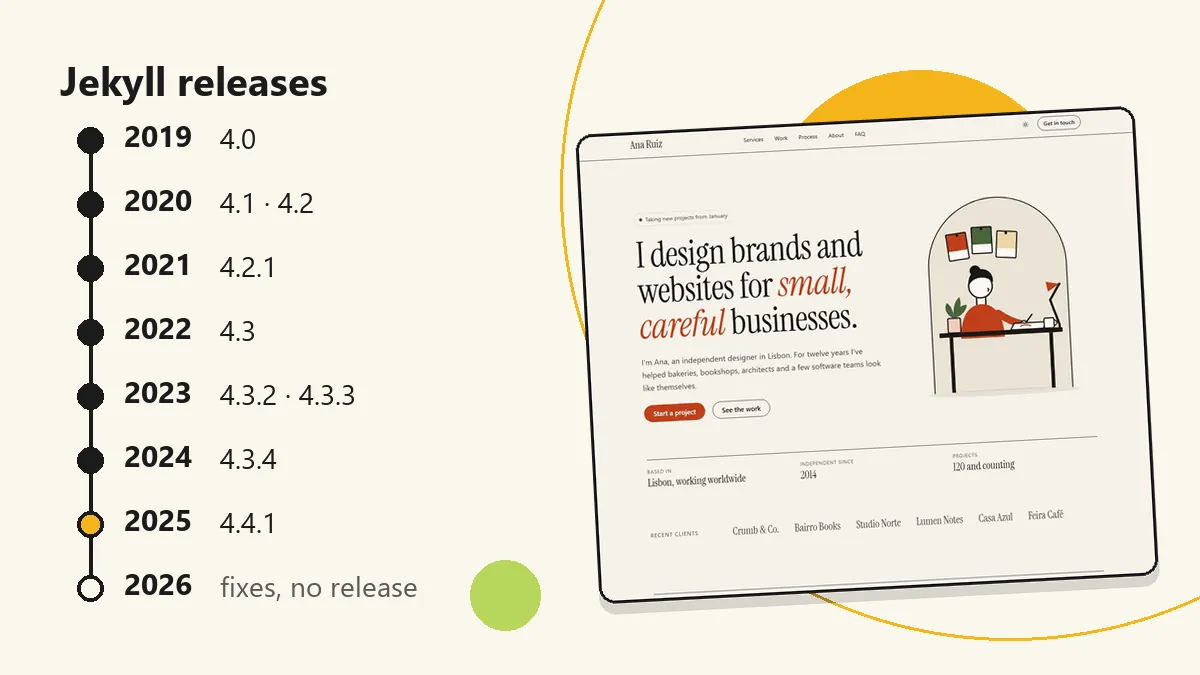
No, Jekyll isn’t dead. It’s maintained slowly by a small team of volunteers. The last release, 4.4.1, came out in January 2025, and the project still gets fixes from contributors. For many blogs, portfolios, and small business sites, the Jekyll static site generator is still a good first choice.
Disclosure: we sell Jekyll themes, so we have a stake in this. We’ve tried to keep the facts checkable and to say clearly where Jekyll is the wrong tool.
The short answer
- Is it dead? No. It’s slow, not abandoned.
- Who runs it? A core team of two volunteers, plus contributors who send fixes in their spare time.
- Latest release: 4.4.1, on 29 January 2025. That’s about 21 months ago as of November 2026.
- Is slow a problem? For a site generator that already does its job, mostly no. It also means few new features.
- Who is it for? Blogs, documentation, portfolios, small business sites, and project pages, especially on GitHub Pages.
- Who is it not for? Very large sites, app-like sites, sites with user accounts, and teams who don’t want to touch Ruby.
What is Jekyll, and what is a static site generator?
A static site generator takes plain files (your text, images, and templates) and builds a folder of ready-made web pages. There’s no database and no server code running when someone visits. The pages are already finished, so they load fast and are hard to hack. You can host them almost anywhere, often for free. If you’re new to the idea, that’s all you need to know.
Jekyll is one of the oldest and best-known static site generators. It’s written in Ruby. You write content in Markdown, add a few settings at the top of each file (called front matter), and use a template language called Liquid for layouts. Small data files in YAML or CSV hold things like team members or prices. It’s also the engine behind GitHub Pages, which is why so many tutorials start with it.
What happened to Jekyll’s maintainers?
This is the story behind “Jekyll is dead”, and it deserves to be told plainly and kindly.
The original lead stepped back. Parker Moore (@parkr), who led Jekyll’s development for years, has since stepped back and is now listed as an emeritus member. He’s still the top all-time committer. By 2021 the team was very small.
The team lost Frank. Frank Taillandier (@DirtyF), a Jekyll core team member, died in September 2021. The team shared the news on 14 September 2021 in Goodbye, Dear Frank, written by Ashwin Maroli. Frank looked after issues, documentation, and the community forum, the quiet work that keeps an open source project usable. Losing him was a real loss for a team that was already small, and it’s worth saying so before talking about release dates.
Two volunteers carry it now. The Core Team is Ashwin Maroli (@ashmaroli) and Matt Rogers (@mattr-). Jekyll describes itself as lovingly maintained by the core team of volunteers. Ashwin worked on the 4.4.x releases. Matt has led the recent build and release work.
Contributors keep it moving. In the 12 months to November 2026, the master branch got about 28 commits from about 20 people. Recent work includes:
- A fix so Jekyll runs on Ruby 4.0 (February 2026)
- Fixes for CI on newer Ruby versions (March 2026)
- Per-collection settings for future-dated posts (March 2026)
- A streamlined release process (April 2026)
- A fix to the
cleancommand (August 2026)
That isn’t a busy project. It is a living one.
How often does Jekyll release?
Here are the main releases, from the GitHub releases page and the Jekyll news archive:
| Version | Released |
|---|---|
| 4.0.0 | August 2019 |
| 4.1.0 | May 2020 |
| 4.2.0 | December 2020 |
| 4.3.0 | October 2022 |
| 4.3.4 | September 2024 |
| 4.4.0 | 27 January 2025 |
| 4.4.1 | 29 January 2025 (latest stable) |
The older 3.x line got 3.10.0 in June 2024.
You can see the pace slow after 2020. The gap since January 2025 is the longest, about 21 months as of this post. The project has about 51,700 stars on GitHub, and RubyGems shows about 45 million total downloads. Jekyll 4.4 needs Ruby 2.7 or newer.
Is “slow” a problem?
It depends on what you want from a tool. Here’s an honest split.
What you lose:
- Big new features are unlikely.
- Pull requests can wait a long time for review.
- GitHub Pages’ built-in build is stuck on an older version (more on that below).
- If something breaks with a new Ruby release, you may wait for a volunteer to fix it.
What you keep:
- Stable Liquid, Markdown, and front matter. What you learn today will still work next year.
- Themes and plugins that keep working instead of breaking on every upgrade.
- A huge base of tutorials, answers, and examples, because Jekyll has been around so long.
- A tool that does one job and stays out of your way.
Mature software doesn’t need a release every month. A site generator turns text into HTML. Once it does that well, the best update is often no update. The real risk with a slow project is not that it vanishes. It’s that it falls behind its surroundings, such as new Ruby versions, and the Ruby 4.0 fix above shows that work is still happening.
Why is Jekyll an easy choice for non-developers?
If you don’t write code for a living, these are the reasons Jekyll is worth a look:
- Markdown. You write posts in plain text with simple symbols. No page builder to learn.
- No JavaScript framework. There’s no build toolchain of Node packages to understand.
- Free hosting on GitHub Pages. Put the files in a repository, switch on Pages, and the site is live.
- Edit in the browser. You can change a page on GitHub’s website without installing anything.
- Themes. Start from a finished design instead of an empty folder. Browse our Jekyll themes.
This is why Jekyll is so often recommended as a static site generator for beginners.
Why do developers still pick Jekyll?
- A simple mental model. Files in, a
_sitefolder out. You can explain the whole thing in a minute. - Liquid templates. Easy to read, with no build step for components.
_datafiles. Keep structured content in YAML or CSV and loop over it in templates.- Plugins. A mature set for sitemaps, SEO tags, feeds, and more.
- Any host. The output is plain HTML, so you can use GitHub Pages, Cloudflare Pages, or Netlify.
- Fast enough. For a normal site of tens or hundreds of pages, builds are quick.
Where is Jekyll a good fit, and where isn’t it?
A good fit:
- Blogs: posts, categories, and tags are built in, and a feed is one plugin away.
- Documentation: Markdown files in folders map well to doc pages.
- Portfolios: a few pages and a set of projects, with little that changes.
- Small business and agency sites: mostly fixed pages that need to be fast.
- Project pages on GitHub Pages: the shortest path from repository to website.
Not a good fit:
- Very large sites (thousands of pages). Builds get slow. Hugo is built for this. See our Jekyll vs Hugo vs Astro guide.
- App-like, interactive sites. If the page behaves like software, use Astro or a JavaScript framework.
- Frequently changing data or user accounts. A static site can’t log anyone in or save what they type on its own. You need a server or a service for that.
- Non-technical editors who need a visual editor. Without a Git-based CMS, editing means Markdown and Git.
- Teams who won’t touch Ruby on Windows. Jekyll’s docs say Windows isn’t officially supported. RubyInstaller is the easiest route, and WSL is the alternative. It works, but it’s the roughest part of setup.
What about GitHub Pages and Jekyll?
This is the part that confuses people most, so here it is clearly.
- GitHub Pages’ built-in build uses Jekyll 3.10.0, as listed on its versions page.
- With GitHub Actions, you can use any Jekyll version, including 4.4.1. Jekyll has a guide for it.
- GitHub’s own docs now recommend Actions for publishing.
So GitHub Pages with Jekyll still works. If you want the newest Jekyll, you set up an Actions workflow. If you’re happy with the built-in build, it works as is.
How do I get started the easy way?
Route 1: GitHub Pages, no install. Start from a theme’s template repository, turn on Pages in the repository settings, and edit files in the browser. Pick a theme that works with GitHub Pages’ built-in build, or it will need an Actions workflow. Nothing runs on your computer. This is the fastest way to a live site.
Route 2: install it locally. Install Ruby, then run bundle install and bundle exec jekyll serve in your project. You can preview changes on your computer before publishing. On Windows, follow the RubyInstaller or WSL steps in the Jekyll docs.
Want Jekyll 4.4.1? Use GitHub Actions to build and deploy, as above.
Prefer Cloudflare? Our guide to deploying Jekyll on Cloudflare Pages covers it step by step. If you’re coming from WordPress, see how to migrate from WordPress to Jekyll.
What are the Jekyll alternatives?
If the list above ruled Jekyll out, these are the usual next steps:
- Hugo: very fast builds and a single program to install. Good for large and multilingual sites.
- Astro: component-based, with no JavaScript by default. Good if you know modern JavaScript and want some interactivity.
We compare all three in Jekyll vs Hugo vs Astro, so we won’t repeat it here.
Frequently asked questions
Is Jekyll still maintained?
Yes. A core team of two volunteers and about 20 contributors worked on it in the past year, with recent changes such as a fix for Ruby 4.0 and a streamlined release process. The pace is slow, and the last release was 4.4.1 in January 2025.
Does GitHub Pages still support Jekyll?
Yes. The built-in build uses Jekyll 3.10.0. If you want a newer version, such as 4.4.1, use GitHub Actions, which GitHub’s docs now recommend.
Is Jekyll good for beginners?
Yes, for content sites. You write Markdown, pick a theme, and publish free on GitHub Pages. The hardest part is usually installing Ruby locally, especially on Windows, and you can skip that by editing on GitHub.
Will my Jekyll site stop working?
Unlikely. Your site is plain HTML once built, so published pages keep working no matter what happens to Jekyll. Your build setup is the only thing that can need attention, for example when a new Ruby version arrives.
Should I start a new site with Jekyll in 2026?
If it’s a blog, documentation, portfolio, or small business site, yes. If it’s very large, interactive, or needs user accounts, look at Hugo, Astro, or a framework instead.
The short version
Jekyll isn’t dead. It’s quiet, stable, and looked after by a few dedicated volunteers. For the kind of site most people build first, that’s a good place to start.
The simplest way in is to start from a theme. Browse all our Jekyll themes or read our guide to the best Jekyll themes. Two examples: Alcor is a free, MIT-licensed one-page theme for freelancers and small studios that works on GitHub Pages, and Izar is a dark, monospace portfolio theme for front-end developers and designers, with a blog and a page for every project.