
IndexNow for Static Sites: Key File, API and Crawler Hints
How to use IndexNow on a static site: submit URL to Bing with Cloudflare Crawler Hints or your own key file, plus the API, response codes and deploy automation.
In this post
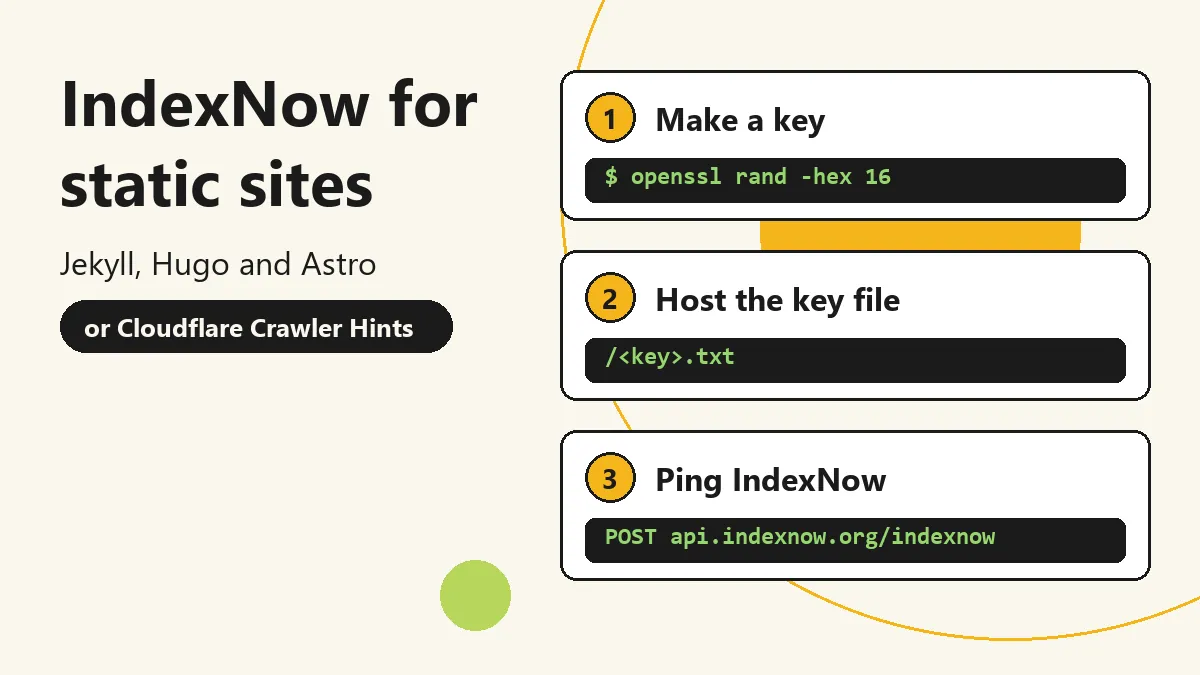
IndexNow is a free protocol that lets your site tell Bing and other search engines the moment a page is added, changed or deleted, instead of waiting for them to come back and notice. On a static site you have two ways to use it: switch on Cloudflare Crawler Hints if your site runs on Cloudflare, or host an IndexNow key file and send URLs to the IndexNow API yourself. This guide covers both for Jekyll, Hugo and Astro.
Everything below was checked on 24 November 2026.
Quick answer
- What it is: IndexNow is an open standard for pushing changed URLs to search engines. Bing, Yandex, Seznam, Naver, Yep, the Internet Archive and Amazonbot take part. Google is not on the list.
- On Cloudflare: turn on Crawler Hints under Caching > Configuration. It is free and needs no key.
- Your own key: make a key with
openssl rand -hex 16, save it as{key}.txtin the folder your generator copies to the site root, and deploy. - Send URLs: a GET request for one URL, or a POST with a JSON list for many, to
https://api.indexnow.org/indexnow. - Order matters: upload the key file and deploy before you ping. Only submit URLs that changed.
- For Google: submit an XML sitemap in Search Console, because Google is not part of IndexNow.
What is IndexNow?
IndexNow is a standard written by Microsoft and Yandex, announced in October 2021. Search engines normally discover changes by crawling your site again and again, and most of those visits find nothing new. Cloudflare put a number on it when IndexNow launched: of the search crawler visits it studied, 53% were wasted on pages that had not changed since the last visit. With IndexNow you tell the search engine which URLs changed, and it can crawl those first. People also search for it as two words, “index now”; it is the same protocol.
You only need to tell one engine. According to the IndexNow FAQ, a submission will be shared across all IndexNow-enabled search engines. The participant list currently names Bing, Yandex, Seznam, Naver, Yep, the Internet Archive and Amazonbot.
For most sites, Bing is the engine that matters here. In December 2024 Bing reported over 3.5 billion URLs submitted per day, with 18% of all new URLs clicked in web search results. If you want to know how to get indexed by Bing, or how to submit URL to Bing without pasting links into a dashboard, IndexNow is the route Bing helped create.
WordPress has Microsoft’s official IndexNow plugin and Rank Math support. A static site uses the same protocol with a text file and one HTTP request.
Does Google support IndexNow?
Not as far as we can find. Google is not on the participant list. In November 2021 Google said it would be testing the potential benefits of the protocol, as Search Engine Roundtable reported. We found no later statement from Google, so we will not guess in either direction.
For Google, do the usual things:
- Generate an XML sitemap and submit it in Google Search Console. The Jekyll Sitemap plugin, Hugo’s built-in sitemap and Astro’s sitemap integration all produce one.
- For an important new page, open URL Inspection in Search Console and use Request indexing.
IndexNow is an addition for Bing and the other participating engines, and it does not replace Search Console.
Option 1: Turn on Cloudflare Crawler Hints
If your site is behind Cloudflare, this is the quickest option. Crawler Hints uses Cloudflare cache signals to tell search engines when your content has likely changed. Behind the scenes it sends those signals to IndexNow. Cloudflare’s launch post said that once it is enabled, you don’t need to do anything else.
Steps
- Open the Cloudflare dashboard and pick your domain.
- Go to Caching > Configuration.
- Find Crawler Hints and switch it on.
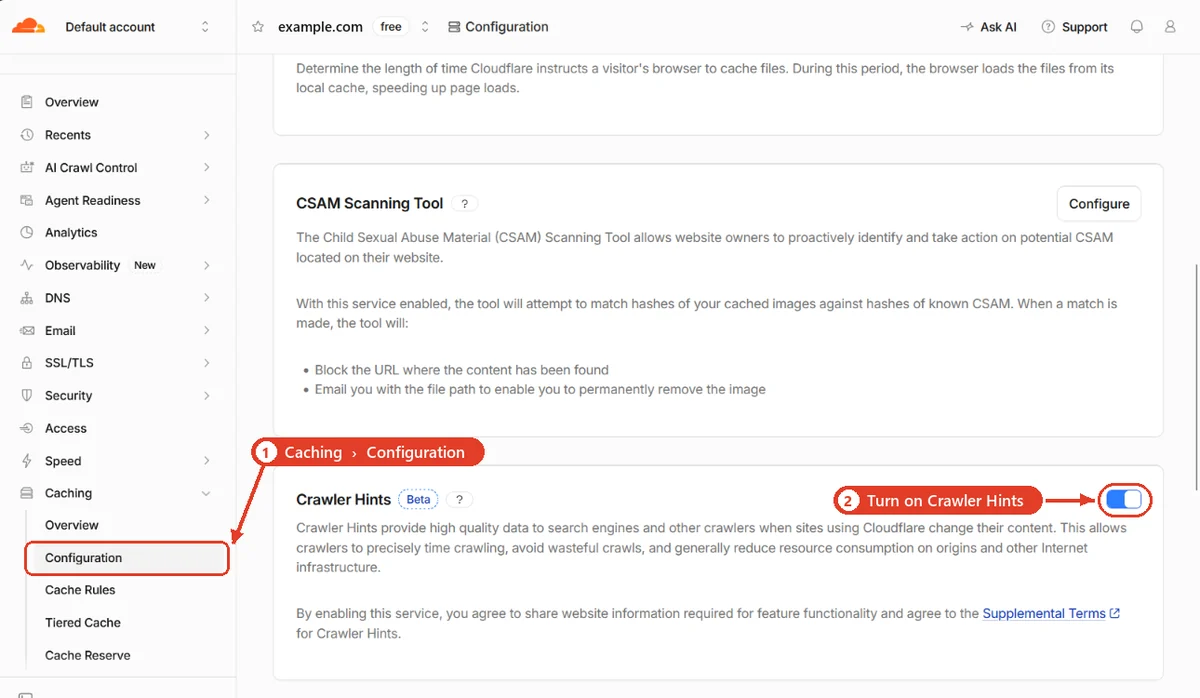
The switch card says that enabling it means you agree to share website information required for the feature to work, and it links the Supplemental Terms. Read them once before you flip it.
We use this on our own store, which runs on Cloudflare with Workers static assets.
What it does
Crawler Hints is available on the Free, Pro, Business and Enterprise plans. Cloudflare uses the cache status MISS to decide that content has likely changed, and sends that to IndexNow. Responses with a status of 4xx and above are not reported. In the first two months, from 18 October to 15 December 2021, Cloudflare processed over 25 billion crawl signals and more than 81,000 customers had opted in.
Limits
- It is global. The docs say that when enabled, Crawler Hints is a global setting for your entire website. To keep a page out, send an
X-Robots-Tag: noindexheader or a robots noindex meta tag, or set the header with a Response header Transform Rule. - It only sees traffic through Cloudflare. It works from Cloudflare’s cache signals, so a page that is never served through Cloudflare never gets reported.
- Some things are not documented. Cloudflare’s docs do not say whether a site must be proxied, whether Workers static assets or Pages sites feed Crawler Hints, or give you a log of what was sent. We have not found a list of the URLs it submitted for our own site.
If you want to know exactly what was sent, and when, use your own key.
Option 2: Set up IndexNow yourself on a static site
IndexNow for static sites needs three parts: a key, a key file on your domain, and a request that lists the changed URLs. None of it needs a server.
Make an IndexNow key
The protocol says the key must be 8 to 128 characters, using only a-z, A-Z, 0-9 and dashes. Any string like that works. A quick way to make one:
openssl rand -hex 16That prints 32 hexadecimal characters, which is well inside the limit. Treat the key as public. It has to sit on your site as a plain text file, so anyone can read it.
Put the key file in Jekyll, Hugo or Astro
The key file is a UTF-8 text file named {key}.txt that contains only the key. The protocol recommends placing it at the site root, for example https://example.com/{key}.txt. Each generator copies files to the output in a slightly different way.
Jekyll
Put {key}.txt in the root of your project, next to _config.yml. Jekyll copies files that have no front matter into _site unchanged, so the key file ends up at the site root. This works the same on GitHub Pages. If you are new to the toolchain, our Ruby and Jekyll install guide gets you to a working build first.
Hugo
Put {key}.txt in the static folder, so the path is static/{key}.txt. Hugo copies everything in static to the site root on build.
Astro
Put {key}.txt in the public folder, so the path is public/{key}.txt. Astro copies public to the output as is.
After the next deploy, open https://yoursite.com/{key}.txt in a browser. You should see the key and nothing else. If you see a 404 or an HTML page, fix that before you send anything.
If you cannot host the file at the root, the protocol lets you point to another location with the keyLocation parameter.
Send URLs with the IndexNow API
You can send requests to the shared endpoint, https://api.indexnow.org/indexnow, which we used for our tests, or to one engine directly, such as Bing’s https://www.bing.com/indexnow. Either one accepts a GET for a single URL or a POST for a list.
One URL, with a GET request:
curl "https://api.indexnow.org/indexnow?url=https%3A%2F%2Fexample.com%2Fblog%2Fnew-post%2F&key=YOUR_KEY"The url value must be URL-encoded.
Many URLs, with a POST request. Send JSON with the content type application/json; charset=utf-8:
curl -X POST "https://api.indexnow.org/indexnow" \
  -H "Content-Type: application/json; charset=utf-8" \
  -d '{
    "host": "example.com",
    "key": "YOUR_KEY",
    "keyLocation": "https://example.com/YOUR_KEY.txt",
    "urlList": [
      "https://example.com/blog/new-post/",
      "https://example.com/blog/updated-post/"
    ]
  }'
keyLocation is optional when the key file sits at the root. A single POST can carry up to 10,000 URLs, and every URL has to belong to the host you name.
Response codes
The protocol documentation lists these responses:
| Code | Meaning | What to do |
|---|---|---|
| 200 | URL submitted | Nothing |
| 202 | Received, key check pending | Confirm the key file is live |
| 400 | Bad request | Fix the format |
| 403 | Key not valid | Check file and key text |
| 422 | URLs or key rejected | Match host and key format |
| 429 | Too many requests | Stop and wait |
A 200 only means the search engine received your URL. It says nothing about indexing. A 403 means the key was not found, or the file was found but the key was not in it. A 422 means the URLs do not belong to the host, or the key does not match the protocol’s format.
We tested this on 24 November 2026. A well-formed key that was not hosted yet got a 202, so a 202 does not prove the key was found. A 5-character key got a 422 with the message “Given key is not valid. Your key should have a minimum of 8 and a maximum of 128 alphanumeric characters.” Repeated test pings for example.com then came back 429.
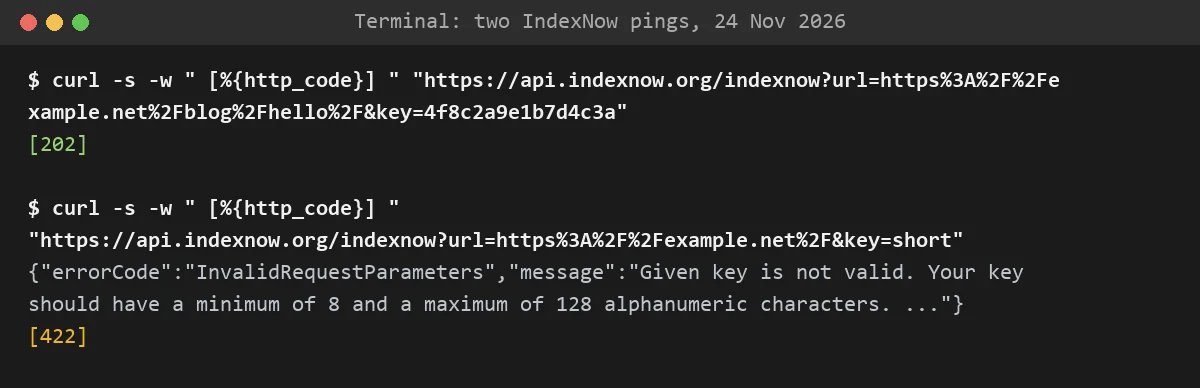
So upload the key file and deploy before you ping, and keep test calls out of loops.
Automate it on deploy
Pinging by hand works for a one-off, but a static site changes on every deploy, so it is better to send URLs as part of the deploy.
What exists today, as of 24 November 2026:
- Astro: astro-indexnow (version 2.3.10, MIT, last published 8 July 2026). It had about 4,900 downloads in the week of 16 to 22 November 2026.
- Netlify:
@netdata/netlify-plugin-indexnow1.0.0. It is a third-party plugin from Netdata, not from Netlify. It notifies IndexNow about added, updated and removed pages after a production deploy. - Jekyll: we found no IndexNow gem on RubyGems. You can still use a script step, and our Jekyll plugins roundup covers what does exist.
- Hugo: we found no module either. Hugo cannot send the request itself, so use a
curlstep after the deploy. - Hosts: we found no built-in IndexNow on Netlify, Vercel, GitHub Pages or Cloudflare Pages.
For Hugo, Jekyll or anything else, a post-deploy step can be this simple. It sends a list of URLs that you built from your changed files:
curl -X POST "https://api.indexnow.org/indexnow" \
  -H "Content-Type: application/json; charset=utf-8" \
  -d '{"host":"example.com","key":"YOUR_KEY","urlList":["https://example.com/blog/new-post/"]}'
Run it only after the new build is live.
What to submit, and what not to
Submit when content is added, updated or deleted. The FAQ is direct about the rest: submit only when content has changed, and do not resubmit unchanged URLs.
- Submit: new posts, edited posts, and pages you removed or redirected. Deleted and redirected pages (404, 410 or redirects) should be submitted too.
- Do not submit: the whole site on every deploy, pages you did not touch, or URLs you have blocked from indexing.
Listing every URL after every build brings back the wasted crawling IndexNow is meant to avoid.
Crawler Hints or your own key: which to use
| Crawler Hints | Your own key | |
|---|---|---|
| Setup | One switch | Key file plus a request |
| Control | Whole site | You pick the URLs |
| Visibility | No log | Response codes |
| Needs Cloudflare | Yes | No |
If your site is on Cloudflare and you want zero work, turn on Crawler Hints. If you host somewhere else, or you want to know what you sent and see the responses, use your own key. Since Cloudflare does not document how Workers and Pages sites feed Crawler Hints, the key file is the option you can check. Our Cloudflare Pages guide for Jekyll shows how to host a site there.
Check it worked
- Open the key file.
https://yoursite.com/{key}.txtshould show your key. A 403 from the API usually means this step failed. - Check the response code. Remember that 200 and 202 only mean the request arrived.
- Use Bing Webmaster Tools. The IndexNow section shows recent submitted URLs and whether they were indexed. It is the best view of what Bing did with your pings.
- Read your server logs, if you have them. Look for requests to your key file and to the URLs you submitted. On a static host without logs, Bing Webmaster Tools is your main source.
Common mistakes
- Pinging before the key file is live. A 202 only means the key check is still pending, and that check needs the file to be there.
- A key that breaks the rules. Under 8 or over 128 characters, or characters outside a-z, A-Z, 0-9 and dashes, earns a 422.
- Submitting URLs from another host. All URLs must belong to the
hostin the request. - Resubmitting everything. Send what changed. A 429 means you are sending too much, so stop and wait.
- Forgetting deleted pages. Removed and redirected URLs belong in the list too.
FAQ
Is IndexNow free?
Yes. The protocol is open and the IndexNow API has no fee. Cloudflare’s Crawler Hints is available on Free, Pro, Business and Enterprise plans.
Does IndexNow guarantee indexing?
No. The protocol states that an HTTP 200 only indicates the search engine has received your URL. The engine decides what to crawl and index.
Does Google use IndexNow?
Google is not on the participant list. In 2021 it said it would test the protocol, and we found no later statement. Submit a sitemap in Search Console and use URL Inspection for your most important pages.
Do I need Crawler Hints and my own key?
No, either is enough. Crawler Hints is the low-effort option on Cloudflare. A key gives you control and response codes. You can run both.
How many URLs can I submit at once?
Up to 10,000 URLs per POST request, according to the protocol documentation. Send only changed URLs.
Does IndexNow work on GitHub Pages?
The protocol works, since it only needs a text file at your site root and an HTTP request. For Jekyll, put {key}.txt in the project root and it is copied as is. We found no built-in IndexNow on GitHub Pages, so you send the request yourself, for example from a workflow step after the site is published.
Pick a theme, then ping
If you are still choosing a stack, our Jekyll vs Hugo vs Astro comparison is a good start, and Is Jekyll dead? covers the state of Jekyll. When you are ready to build, browse our Jekyll themes, Hugo themes and Astro themes.